SQLite & PostgreSQL · Native macOS (No Electron) · MIT Open Source

Browse your database
like the web.

A fast, keyboard-first database browser, foreign-key navigator, and SQL console for local files and remote SSH servers. Click foreign keys to jump across tables, hit Back without losing filters, and paste any ID into ⌘K to find matching rows everywhere.

Apple Signed & Notarized DMG (46 MB) · Read-only by default · Zero telemetry · Source on GitHub
DataDip — Live Walkthrough (FK jump, Cmd+K, SQL Console, Prod Safety)
Ready SQLite (Local)

Native bun:sqlite, read-only handles by default, live .db/-wal auto-refresh, Finder double-click & datadip ./app.db.

Ready PostgreSQL (Direct TLS)

Built-in Bun.SQL, paste any DATABASE_URL (Supabase, Neon, RDS), enforces BEGIN READ ONLY, real CancelRequest.

Ready PostgreSQL over SSH

Local OpenSSH port forwarding (ssh -N -L) honoring ~/.ssh/config & ProxyJump. Zero software needed on remote host.

Ready SQLite over SSH

One persistent multiplexed SSH session per host with parallel query workers and in-app SSH_ASKPASS prompts for keys & 2FA.

Built for debugging real production data

No bloated wizard dialogs, no JVM warm-up, no Electron RAM tax. Just the tools you actually reach for during an incident or schema deep dive.

01 / NAVIGATION

Web-native foreign-key traversal

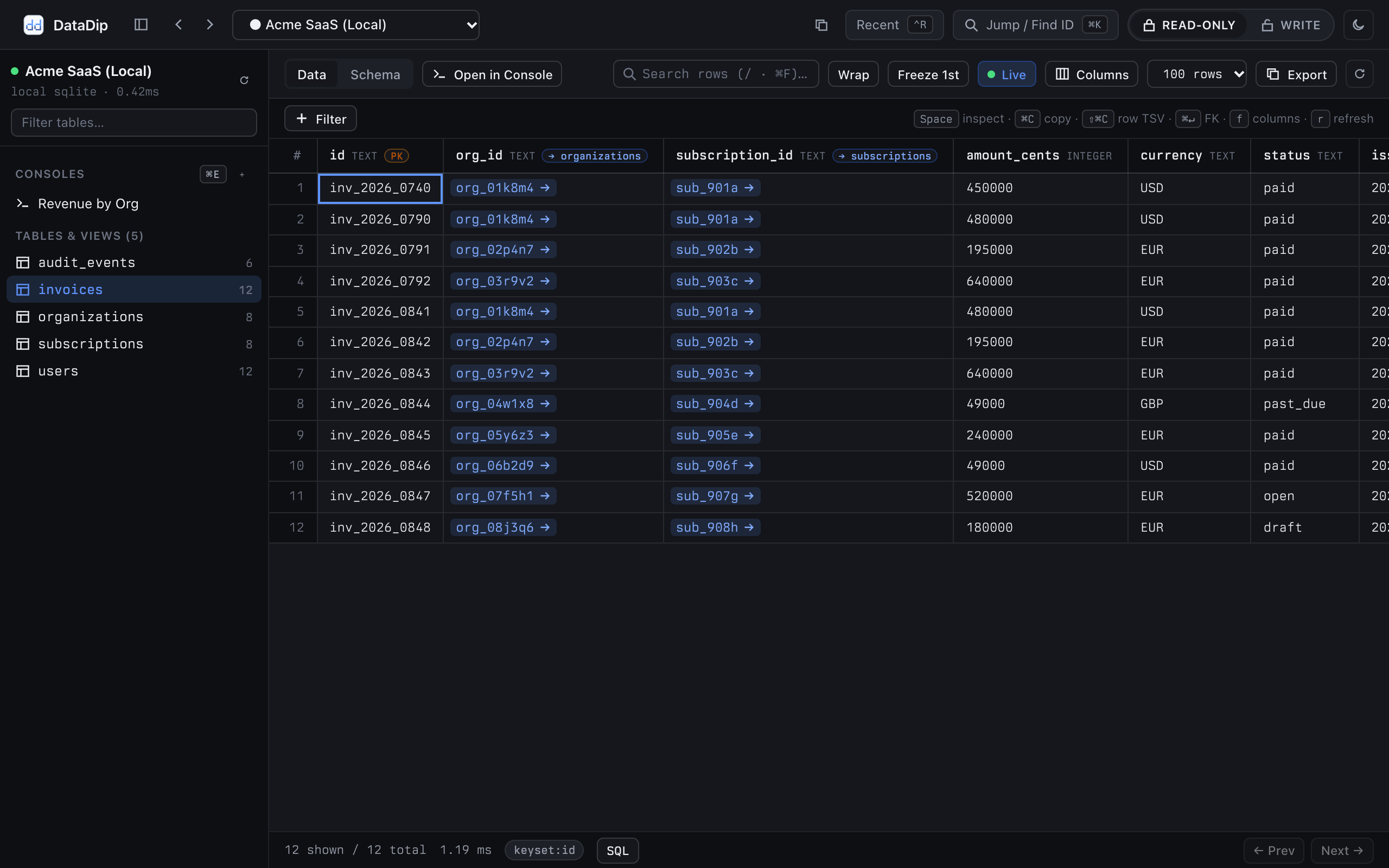
Every foreign key is a real link. Hover to peek the target row, click to jump straight to it, and press Space on any row to see incoming Referenced by counts across every table. Every view lives in browser history, so ⌘[ / ⌘] and trackpad swipes return to your exact filters and scroll position.
02 / SAFETY

Read-only by default, crimson in prod

Every database opens Read-Only at the driver and SQL-transaction layer. Production databases display a persistent crimson bar and auto-relock Read-Write after 10 minutes idle. Inline edits are staged with a parameterized SQL preview before committing, and destructive SQL (DROP, ALTER, DELETE/UPDATE without WHERE) always requires confirmation.

03 / SQL CONSOLE

Parallel, cancellable SQL consoles

Open tabbed or side-by-side split consoles (⌘E) powered by CodeMirror 6 with live schema autocomplete, SQL linting, formatting (⌘⇧F), active-statement execution (⌘↵), and EXPLAIN. Queries run on dedicated workers and cancel cleanly mid-flight with ⌘..

04 / OMNIBAR

Paste a ticket ID, find it everywhere

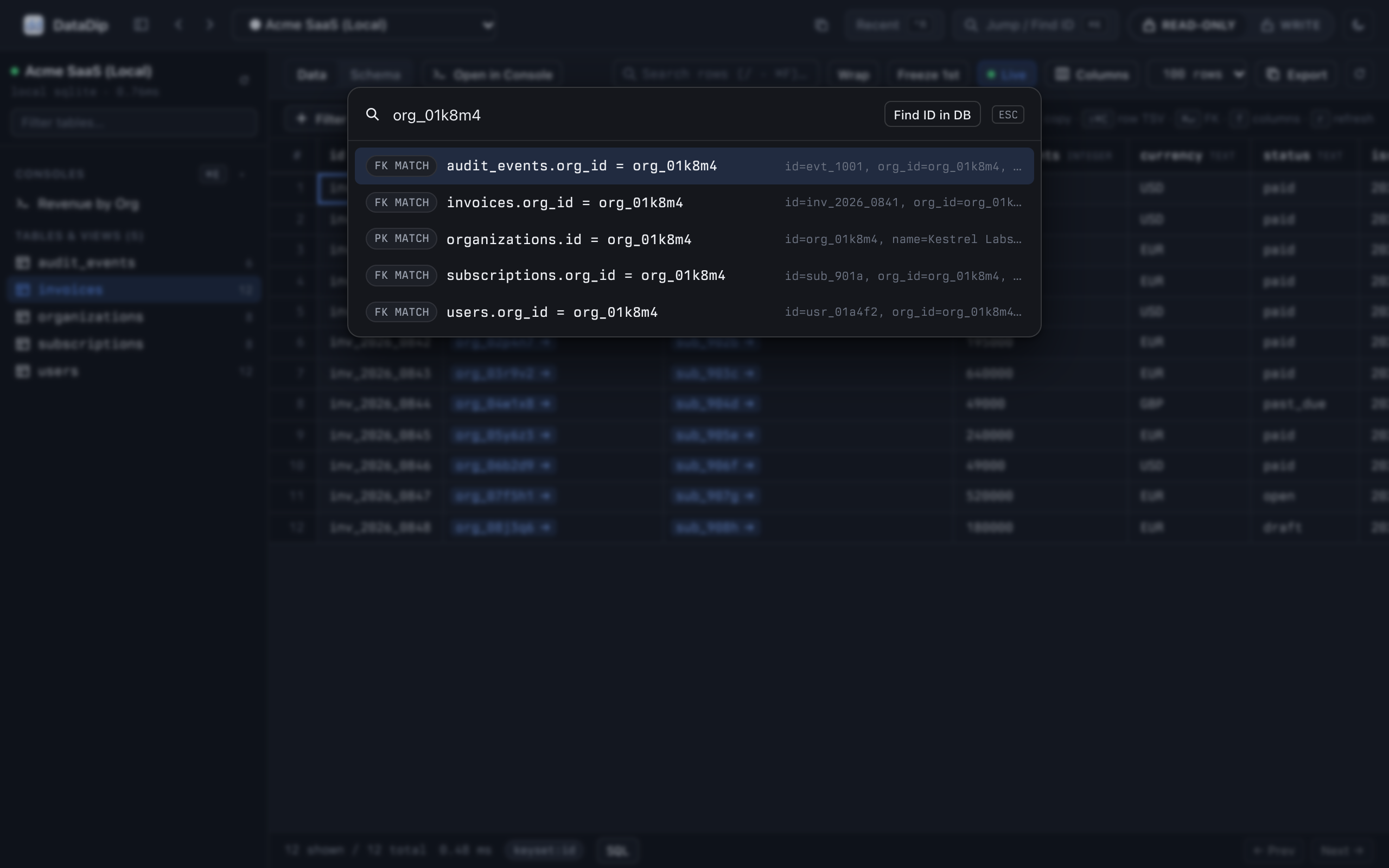
Hit ⌘K to jump to any table, column, saved console, or connection — or paste an ID from a support ticket or Sentry trace and run Find ID in DB to locate matching primary and foreign keys across every table in one shot.

05 / EXPORTS & SCALE

Large-table guards & full exports

Keyset cursor pagination stays fast deep into tables, and automatic full-table COUNT(*) is skipped on large databases (using pg_class.reltuples / sqlite_stat1). Export full table views or query results up to 100k rows as CSV, TSV, JSON, Markdown, or SQL INSERT.

06 / LOCAL-FIRST

Live .db auto-refresh & SSH askpass

Local SQLite tables watch .db / -wal files and refresh automatically as your app writes (pausing whenever you have unsaved edits). Over SSH, encrypted key passphrases, 2FA prompts, and unknown host-key checks open in a native in-app dialog and are never logged or saved.

Relational Navigation

Follow relationships in both directions

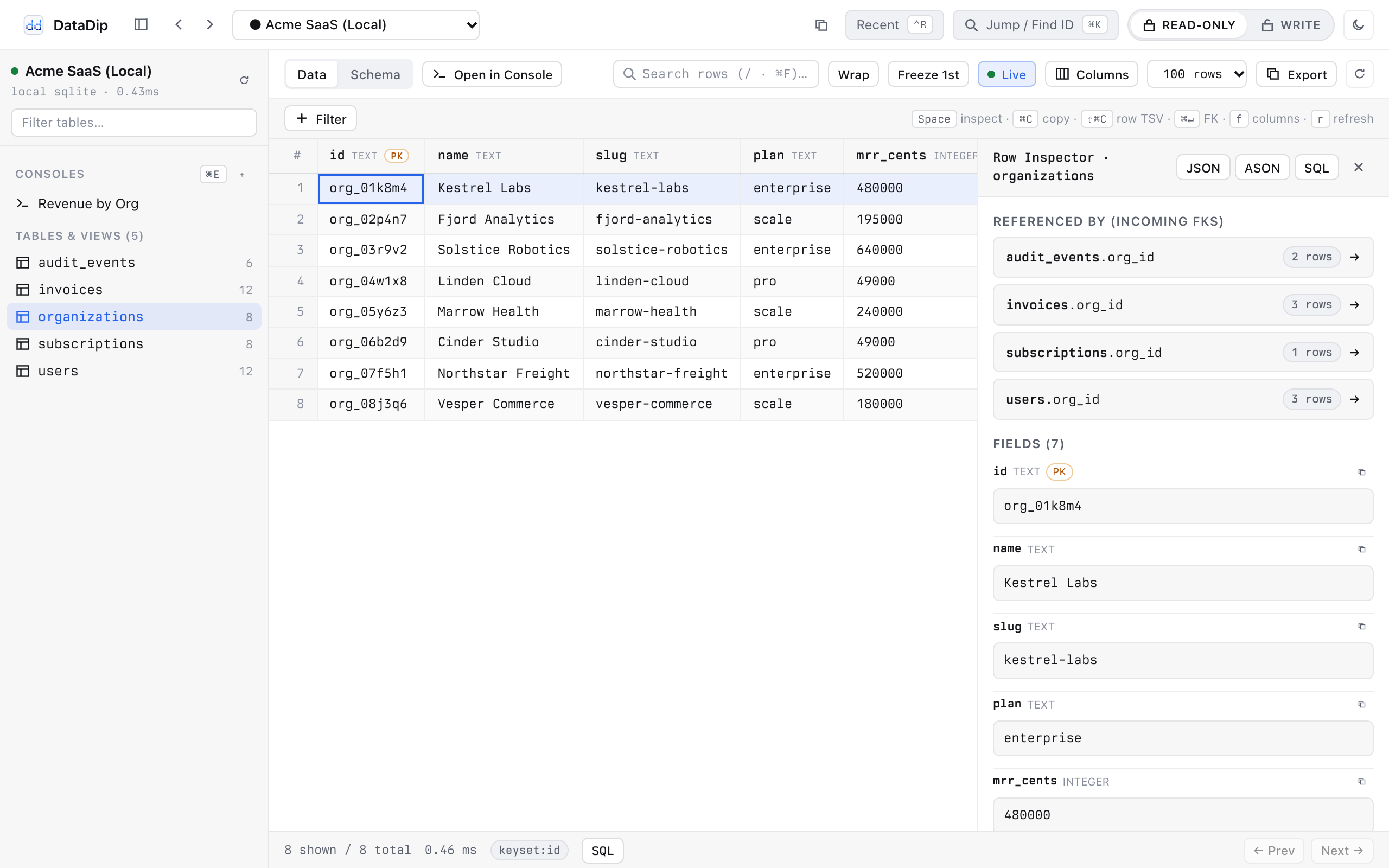
Click a foreign-key pill to jump from invoices.org_id straight into organizations. Press Space on any row to inspect formatted fields and see every table referencing that record — with live row counts you can click straight into.

  • Hover any FK cell to peek the target row without leaving your table
  • Pin the first column (Freeze 1st) and drag-resize or double-click auto-fit headers
  • Copy cells (⌘C) or full rows with headers as TSV (⌘⇧C)
DataDip Row Inspector showing incoming foreign key counts across tables in light mode
SQL Console

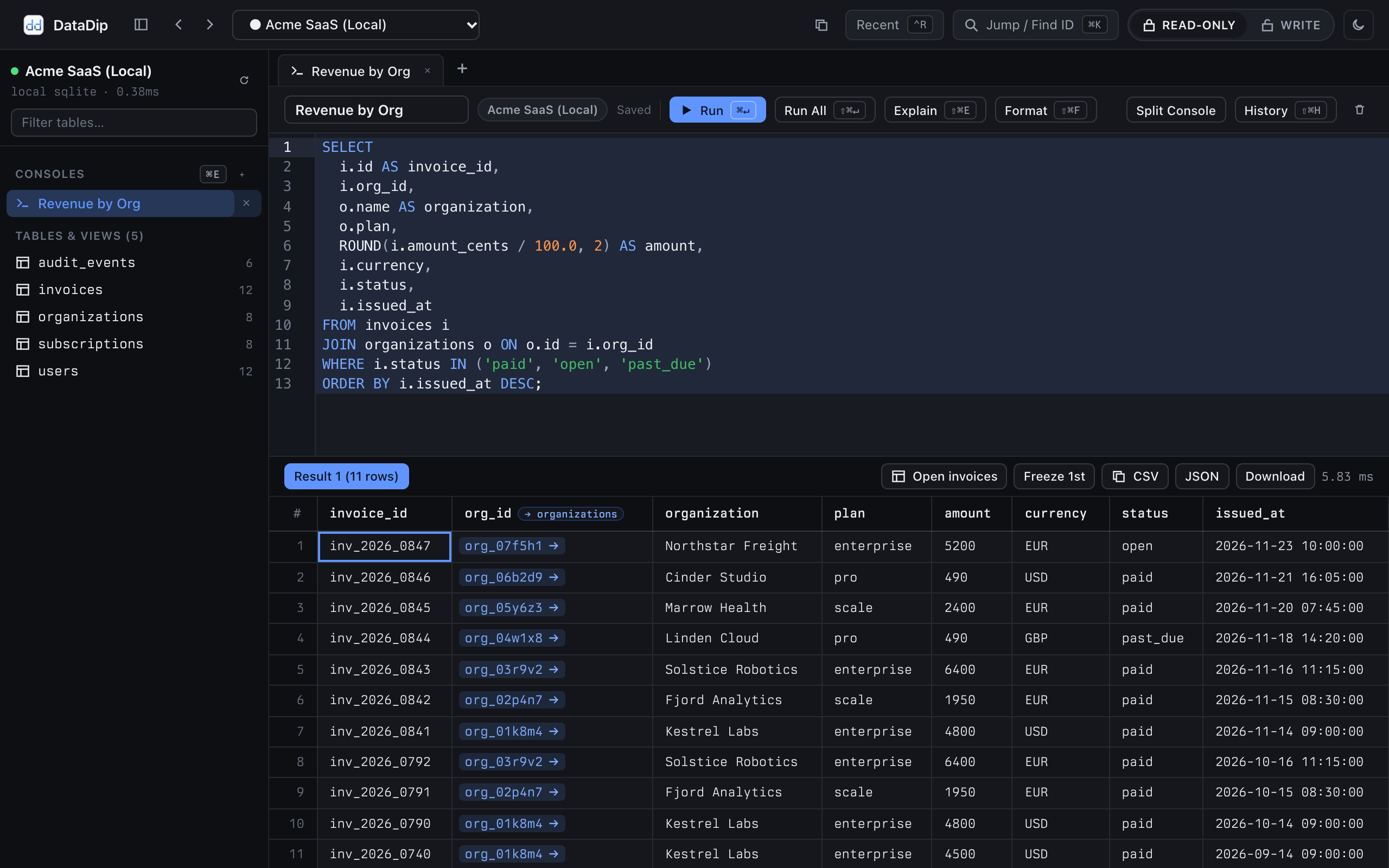
Clickable foreign keys right inside SQL results

DataDip detects the source table of your query and turns foreign-key columns in the result grid into clickable links. Run multiple queries concurrently without blocking table browsing, split two consoles side by side, and download full results in one click.

  • Active-statement highlight + run single (⌘↵) or run all (⌘⇧↵)
  • Real server-side cancellation (⌘.) on SQLite workers and PostgreSQL
  • Persistent query history (⌘⇧H) and saved consoles stored locally
DataDip SQL Console running a JOIN query with clickable foreign keys in dark mode
Production Guardrails

You should never wonder if you are in prod

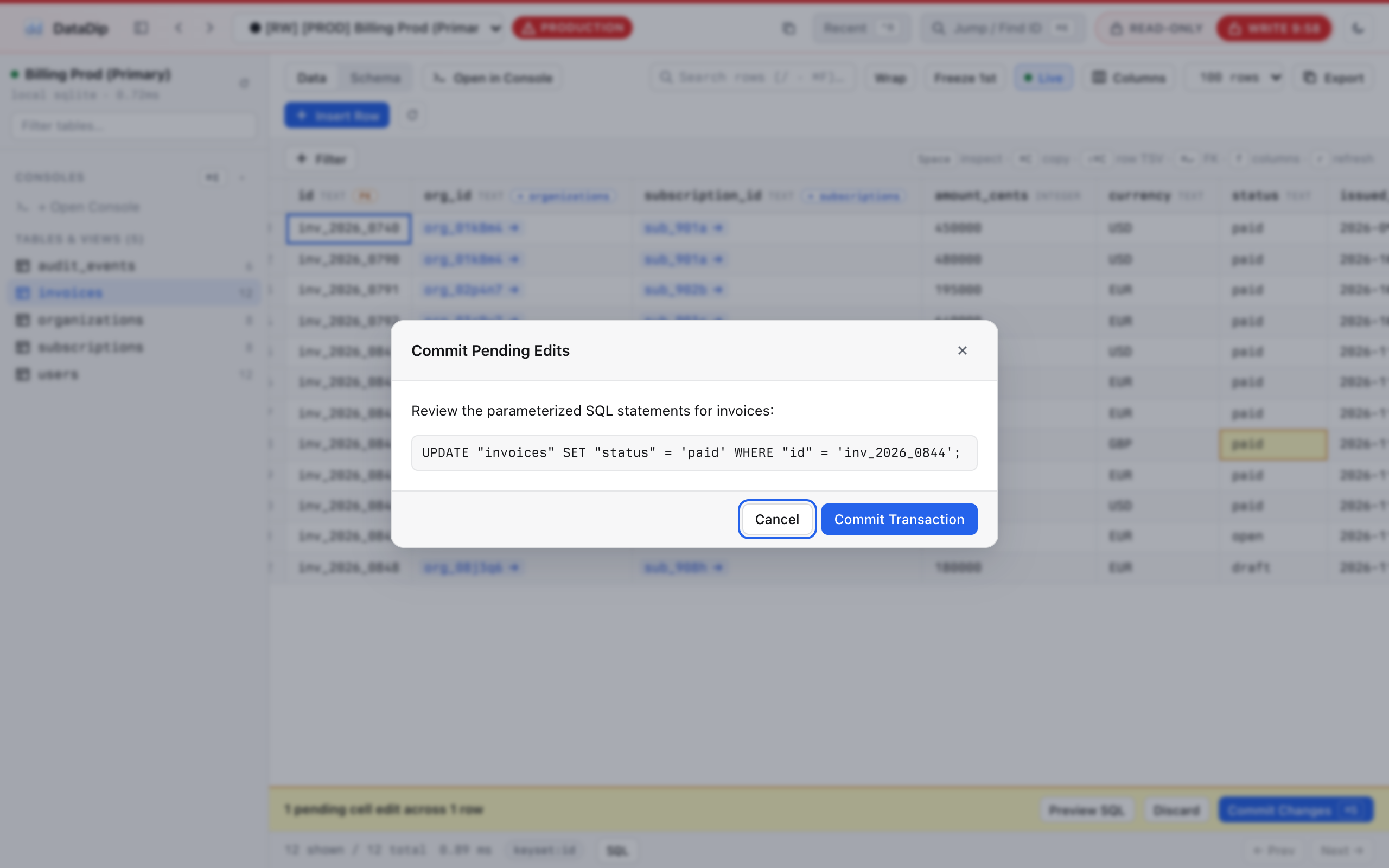
Flag a connection as Production and DataDip paints a crimson top edge and PRODUCTION badge across every screen. Arming Read-Write shows a live 10-minute auto-relock countdown, and inline grid changes always preview the exact parameterized UPDATE SQL before committing in a single transaction.

  • Driver-level Read-Only handles ({ readonly: true } / BEGIN READ ONLY)
  • Staged inline edits highlighted in amber with SQL preview & one-click Discard
  • Destructive SQL confirmation dialog on every database, not only prod
DataDip Production Safety bar with Read-Write timer and Commit Pending Edits SQL preview
Omnibar · ⌘K

Paste an ID from a support ticket. Jump straight to the row.

Stop writing five SELECT * FROM ... WHERE id = ... queries just to figure out which table owns an opaque ID. Paste it into ⌘K, hit Find ID in DB, and jump directly to every matching primary or foreign key row.

  • Fuzzy-search tables, columns, saved consoles, and connections
  • Recent Databases & Tables switcher on ⌃R
  • Live connection config in hand-editable ~/.datadip/data/connections.ason
DataDip Omnibar finding matching primary and foreign key rows across five tables

How DataDip compares

An honest breakdown against the database GUIs developers reach for most.

Capability DataDip TablePlus DataGrip DBeaver Beekeeper Studio
License & Pricing Free · MIT Open Source Paid ($99+ license) Paid ($109+/yr) Apache CE / Paid PRO GPL CE / Paid Ultimate
Runtime & Footprint Native macOS WKWebView + Bun (~46 MB) Native (Swift/C++) JVM (JetBrains IDE) JVM (Eclipse RCP) Electron (Chromium)
Read-Only by Default Yes Driver + SQL gate Opt-in per connection Opt-in per connection Opt-in per connection Opt-in per connection
Prod Auto-Relock & Staged SQL Preview Yes Crimson bar + 10m timer Color tag + Safe Mode Color tag Color tag Color tag
Browser-Style FK Jump + Back/Forward Yes URL history + reverse FKs FK jump (no trail) FK jump FK jump Basic FK jump
Paste Any ID → Search All Tables Yes Built-in (⌘K) No Full-text search Full-text search No
Local SQLite Live .db Auto-Refresh Yes fs.watch + SSE Manual refresh Manual refresh Manual refresh Manual refresh
Instant CLI Open (datadip ./app.db) Yes CLI + Finder + ⌘O Finder / URL scheme CLI launcher CLI flags Finder open
SSH Tunnels & Interactive Auth Yes ~/.ssh/config + SSH_ASKPASS Yes Built-in SSH Yes Built-in SSH Yes Built-in SSH Yes Built-in SSH
Database Engines SQLite & PostgreSQL 15+ engines 25+ engines 80+ engines 10+ engines

Honest scope note: DataDip focuses deeply on SQLite and PostgreSQL right now. If you need MySQL, MSSQL, Oracle, or Snowflake today, TablePlus, DataGrip, or DBeaver are better fits.

Keyboard-first without fighting macOS

Familiar TablePlus & DataGrip bindings while keeping native macOS Emacs keys (Ctrl+A/E/K) and CodeMirror indent/dedent intact.

⌘KOmnibar: jump to table, console, or Find ID across DB
⌃RRecent databases & tables switcher
⌘EOpen or focus active SQL Console
⌘↵Run active SQL statement (or follow focused FK cell)
⌘.Cancel running query immediately
SpaceToggle Row Inspector with incoming FK counts
⌘[ ⌘]Navigate Back / Forward across FK jumps
⌘⇧CCopy focused row with column headers as TSV
⌘SCommit staged inline edits (with SQL preview)
⌘OOpen a local SQLite file directly in DataDip.app

Get DataDip

Self-contained macOS app with zero dependencies, or run from source on macOS and Linux.

macOS & Linux

Build & Run from Source

Runs as a local HTTP server (127.0.0.1:4747) in any browser, plus builds ~/Applications/DataDip.app on macOS if swiftc is installed.

shell
git clone https://github.com/anttikissa/datadip.git
cd datadip
./install
usage
datadip              # start server & open UI
datadip ./app.db     # open a SQLite file directly
datadip stop         # stop background server

./install installs Bun if missing, builds the web client, links ~/.local/bin/datadip, and stores local config & history in ~/.datadip/data.